KioSync · Restaurant software for India
QR table ordering and kitchen display for restaurants
One dashboard. Every order. Zero chaos.
KioSync is restaurant software for India. Guests scan the QR on their table and order from their own phone, with no app to download. Orders reach your kitchen display in real time, are read aloud in Hindi, Marathi or English, and every bill comes with GST worked out.
No card needed · Zero commission on your payments
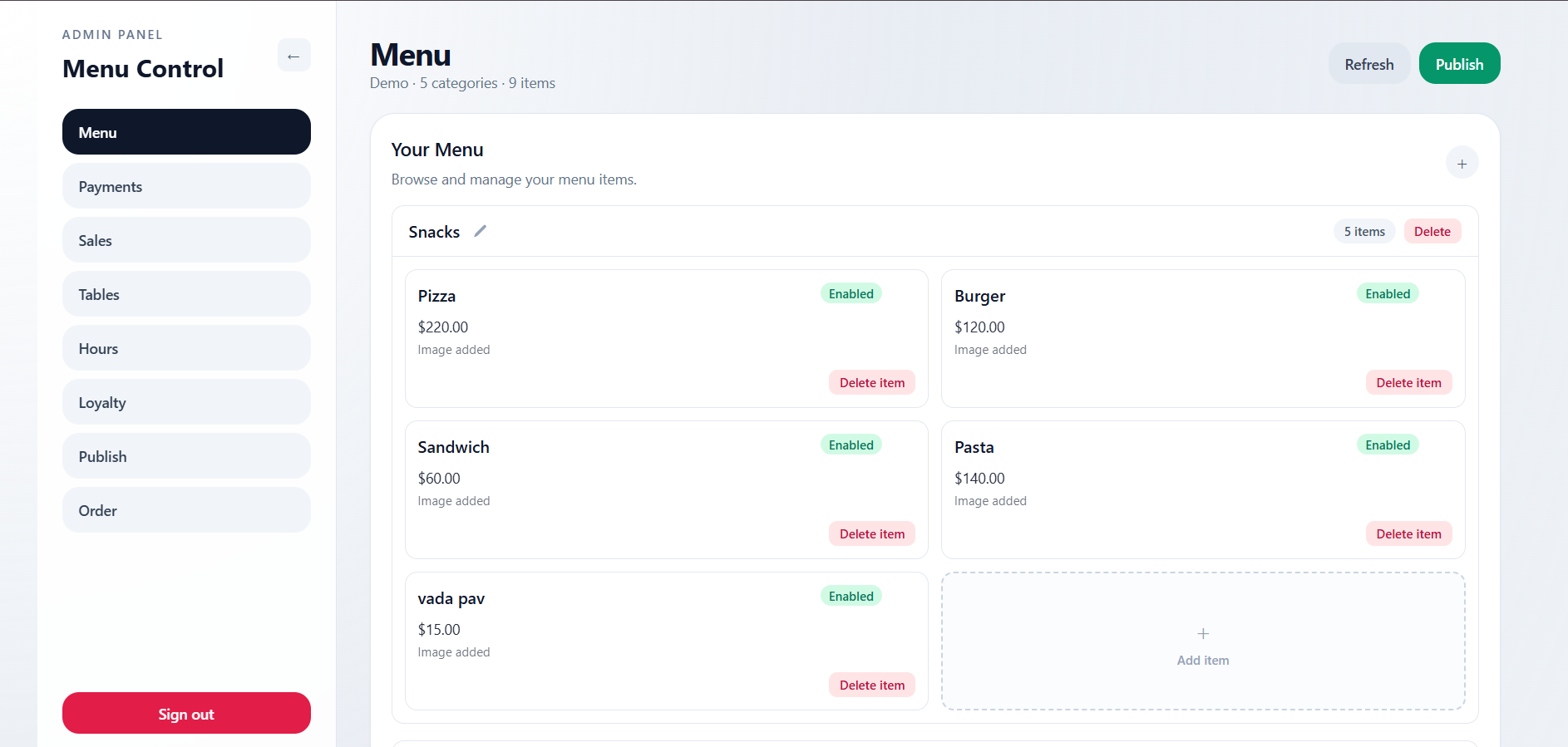
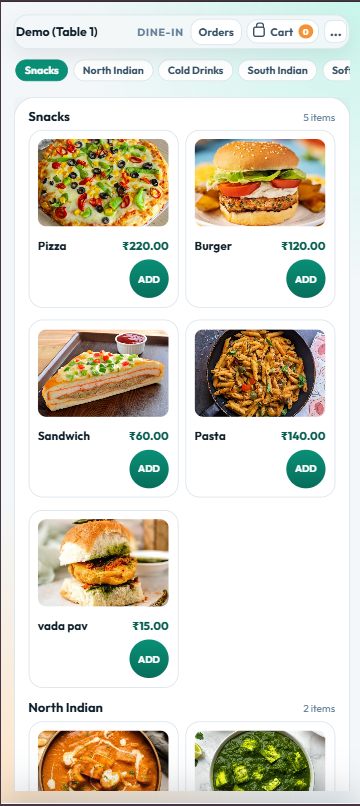
Try KioSync Right Now
We've set up a sandbox restaurant just for you. Place an order from the guest menu, watch it appear on the kitchen display, and see it in the admin dashboard.
Product
Four apps. One loop. Nothing falls through.
Customers order from their own phone.
Put a QR code on each table. Guests scan it, browse your full menu with photos, sizes and add-ons, and pay online through your own Razorpay, PayU or PhonePe account or at the counter — no app download, no waiting to catch a server’s eye.
- Photo menu cards with quick + / − buttons
- Cart survives refreshes and network drops
- Prices, GST and sold-out items checked on our server
- Dine-in or takeaway, with a note for the kitchen
- Double taps and retries never create duplicate orders
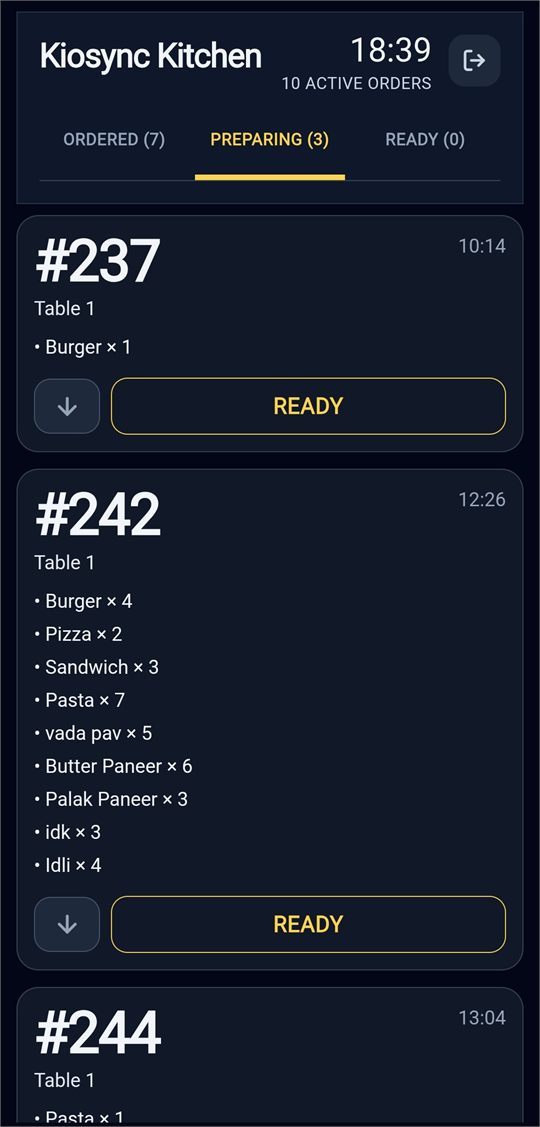
Every order lands on the kitchen screen in real time.
Cash orders appear on the kitchen display the moment they’re placed; online orders appear as soon as payment is confirmed. Each new order is read aloud in Hindi, Marathi or English, so nobody misses a ticket during a loud rush.
- Real-time updates that resync after network drops
- Voice announcements in Hindi, Marathi or English
- Queued → Preparing → Ready → Served status flow
- Runs in any modern browser, plus Android (7.0+) and Windows apps
Your entire operation on one screen.
See every order across every table, print GST tax invoices with one click, mark dishes sold out and set your opening hours, from a laptop or tablet.
- Orders with Today / 7 days / All filters and payment status
- GST invoices with CGST/SGST split and CA export
- Menu items, photos, prices and sold-out toggles
- Opening hours, GST settings and payment modes
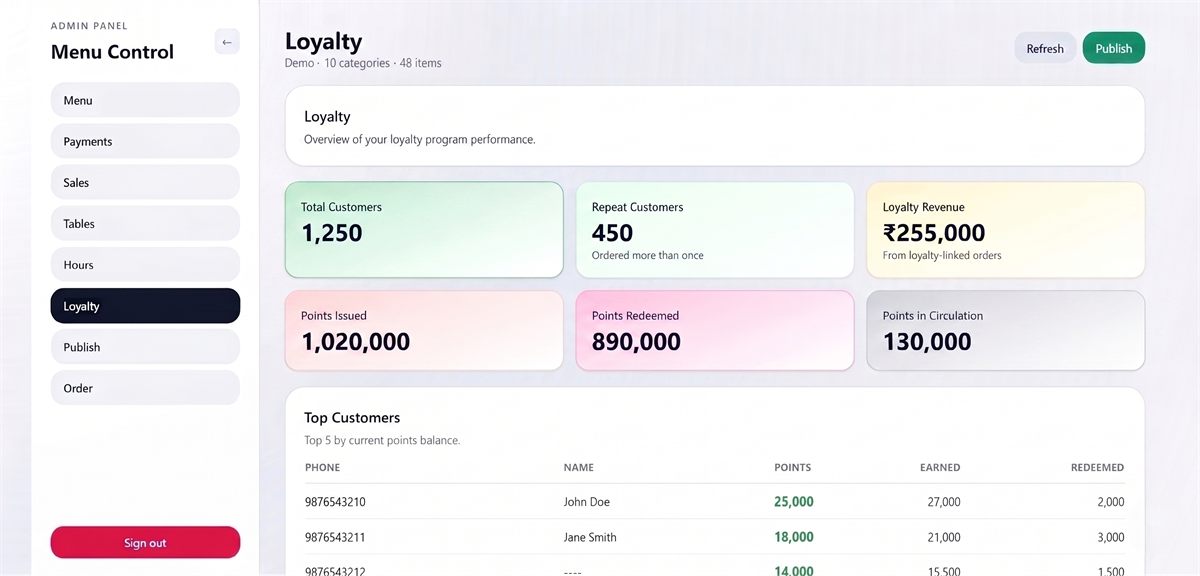
Reward regulars. Block abusers. Automatically.
On the Basic and Pro plans, guests earn points on paid orders with just their phone number. Redemption is capped at a share of the bill, with a minimum order and a cooldown, so nobody can earn big and spend it all on a tiny order.
- Redemption capped at a set % of the bill (default 20%)
- Points calculated on our server, not the phone
- Phone-number accounts, no app or card
- Minimum order and cooldown rules
Features
Everything from the table to the kitchen to the bill
QR table ordering
Guests scan the table QR and order from their own phone, with no app.
Kitchen display system
A live kitchen screen that reads new orders aloud in Hindi, Marathi or English.
Call waiter
Guests ask for water, cutlery, help or the bill from the table in one tap.
Table management
Optional captain mode: a live floor plan, table sessions and running bills.
GST billing
GST tax invoices with CGST/SGST split, counter billing and a CSV for your CA.
Payments
Online payments through your own Razorpay, PayU or PhonePe, with zero commission.
KOT printing
KOTs and bills print to LAN thermal printers through the Windows app.
Security
Tamper-proof table codes, server-checked prices and ways to limit unwanted orders.
How It Works
From scan to served in three steps
Print a QR for each table
Generate a QR code for every table in the admin panel. Download them one at a time or as a print-ready PDF sheet.
Guests scan and order
They open your menu in the phone browser, pick sizes and add-ons, add a note for the kitchen and pay online or at the counter.
The kitchen gets it instantly
The order appears on your kitchen display in real time and is read aloud in Hindi, Marathi or English.
Why KioSync
Who it's for
Built for cafes, QSRs, dine-in restaurants and canteens
Cafes
Table and counter ordering, photo menus and GST bills for cafes.
Quick-service restaurants
One kitchen queue for QR and counter orders, read aloud as they arrive.
Dine-in restaurants
Table QR ordering, call waiter and optional captain mode with a floor plan.
Canteens
Shorter counter queues with phone ordering, optional pay-first and opening hours.
Scale without the chaos
No per-device charges and no commission on your payments. Prices are per month; GST is extra and a one-time setup fee may apply.
Starter
For small cafes and outlets moving to QR ordering.
- QR code table ordering
- Digital menu with photos, sizes and add-ons
- Real-time order management
- KOT and bill printing (Windows app)
Basic
For busy restaurants that want regulars coming back.
- Everything in Starter, plus:
- Phone-number loyalty program
- Sales analytics: item-wise and hourly
- WhatsApp updatesComing soon
- Happy Hour pricingComing soon
Pro
For restaurants that want stock and staff in the same system.
- Everything in Basic, plus:
- Ingredient and recipe stock tracking
- Team & HR: attendance, late marks and payroll
- Smart upsellingComing soon
- Guest menus in more languagesComing soon
- Multi-outlet dashboardComing soon
Frequently asked questions
What is KioSync?
KioSync is cloud-based restaurant software (SaaS) for India. Guests scan a QR code on their table and order from their own phone, orders appear on a live kitchen display that reads them aloud, and staff bill with GST invoices from the admin panel. It also covers counter billing, call-waiter requests, online payments through your own gateway and KOT printing with the Windows app, plus phone-number loyalty on the Basic and Pro plans.
Do guests need to download an app?
No. The menu opens in the phone’s browser after scanning the table QR.
What do I need to get started?
Your menu, a printed QR code for each table (KioSync generates them), and a phone, tablet or laptop for the kitchen display. For automatic KOT and bill printing, add a Windows PC running the KioSync desktop app and a network thermal printer.
How much does KioSync cost?
Starter is ₹999, Basic ₹1,499 and Pro ₹1,999 a month, GST extra. A one-time setup fee may apply. KioSync offers a 15-day free trial, no card needed.
Does KioSync take a commission on payments?
No. Online payments go through your own Razorpay, PayU or PhonePe account and settle to your bank. KioSync charges the monthly plan (plus a one-time setup fee where it applies) and never takes a cut of your payments.
Which languages can the kitchen voice speak?
Hindi, Marathi or English, and you can set how tricky dish names should be pronounced.
Can I control when a table’s QR code takes orders?
Yes, with two optional switches. Table sessions (captain mode, which KioSync switches on for your restaurant on request) make a table’s QR accept orders only while staff have that table open, and pay-first mode (cash turned off) sends orders to the kitchen only after online payment is confirmed. Printed QR codes don’t expire, so these switches are how you limit orders from people who aren’t at the table.
Does KioSync print KOTs?
Yes. With the KioSync Windows app, KOTs print as soon as a cash order is placed and bills print once it’s paid, straight to LAN thermal printers.
Guides
Guides for restaurant owners
Customer-friendly restaurant
Practical ways to make every visit easier for your guests.
Reduce wait times
Where wait time comes from and how to cut it at each step.
Is QR ordering safe?
The real risks of QR ordering and the checks that stop them.
How QR ordering works
What happens from the scan to the kitchen to the bill.
QR vs kiosk vs tablet
Three self-ordering setups compared on cost, space and fit.
What is a KOT?
What a kitchen order ticket is and how it differs from a bill.
Let's get your restaurant running smarter
Tell us a bit about your place and we'll set you up with a working trial: QR ordering, kitchen display and admin. No credit card needed, and you can cancel any time during the trial.