Feature
Kitchen display system with voice announcements
KioSync’s kitchen display shows every QR, counter and captain order on one live screen and reads each new order aloud in Hindi, Marathi or English, so cooks don’t have to keep checking the screen.
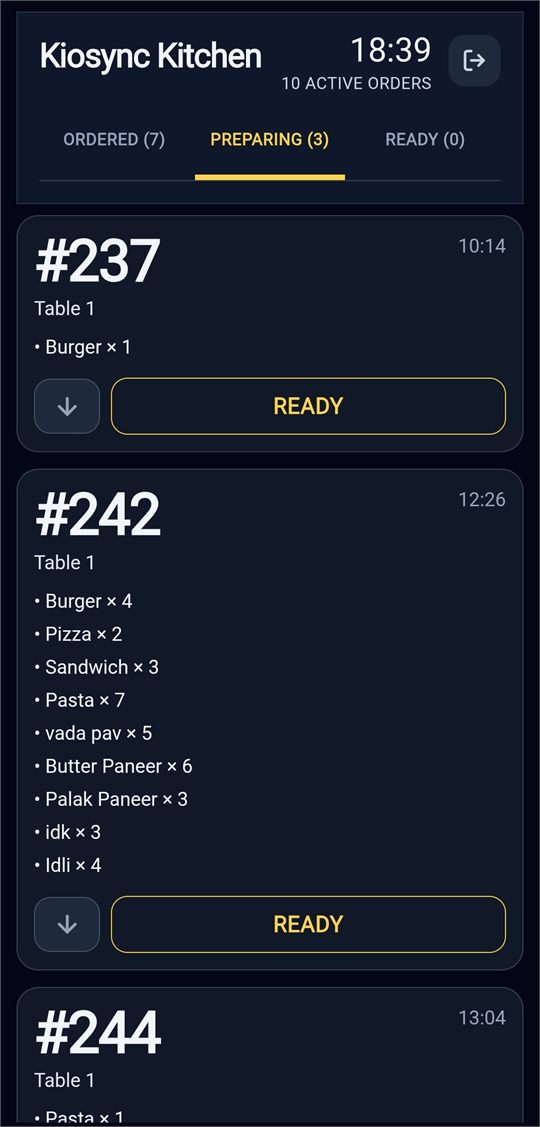
Every order on one screen
Orders from the table QR, orders rung up at the counter and, in the optional captain mode, orders captains take for a table all land in one queue on the kitchen display (KDS). Each order moves through four stages: Queued, Preparing, Ready and Served. Ready orders close automatically after 5 minutes, so finished orders don’t crowd the screen.
The guest’s note for the kitchen, such as “extra spicy, no onion”, shows on the order, so cooks see it before they start. Kitchen staff sign in with their own username and password.
Voice announcements in your kitchen’s language
When a new order arrives, the kitchen display plays a short chime and then reads the order aloud, for example “New order. Table 4. 2 Pizza, 1 Burger.” You choose Hindi, Marathi or English for your restaurant in the admin panel. In Hindi and Marathi, numbers and dish names are written in Devanagari before they are spoken, so the voice reads them in that language.
If the voice says a dish name wrong, type how it should sound, in up to 50 characters, and it uses your spelling from then on. Cash orders are announced as soon as they are placed, and online orders once they are paid. Guest notes stay on screen rather than being read out.
Prep view for rush hours
Prep view adds up the same item across tables, for example “Paneer Tikka ×5 — Table 6 ×4, Table 7 ×1”, so the kitchen can cook in batches when several tables order the same dish. Prep view is optional, and KioSync switches it on for your restaurant on request.
Waiter calls on the same screen
When a dine-in guest asks for water, a waiter, cutlery or the bill from the table QR page, the kitchen display plays a two-tone chime that sounds different from the new-order chime and shows a banner with the table number and the request. Staff acknowledge it with one tap. Repeat taps for the same request within 60 seconds are merged into one, so a busy table can’t flood the screen. More on call-waiter requests.
Built for patchy Wi-Fi
The kitchen display keeps a live connection open and updates in real time. If that connection drops, the screen keeps checking for new orders every few seconds, and when the connection returns it resyncs every order on its own, so nobody has to refresh it. It also checks itself against the server once a minute as a safety net.
In the KioSync Windows app, a reconnecting page shows while the computer is offline, and alert sounds keep playing when the app is minimised.
Unpaid online orders stay off the screen
Online orders appear only after the payment gateway confirms payment, so the kitchen never starts on an online order that hasn’t been paid. If a guest gives up halfway through paying, the order cancels itself after 20 minutes and never reaches the kitchen. Cash orders show straight away, so the kitchen can start while the guest pays at the counter. To make every order pay first, turn cash off; see payments.
Runs on screens you already have
The kitchen display runs in the browser on a tablet, laptop or desktop, so there is no proprietary hardware to buy. There is also an Android app (Android 7.0+) and the KioSync Windows app, which opens the kitchen display, keeps the screen awake and starts when you sign in to Windows.
You can run more than one kitchen screen. Each one shows every order: sending orders to separate bar or grill screens isn’t available yet.
Frequently asked questions
Which languages can the kitchen voice speak?
The KioSync kitchen voice speaks Hindi, Marathi or English, and you choose the language for your restaurant in the admin panel.
Do I need special hardware?
No. The KioSync kitchen display runs in any modern browser on a tablet, laptop or desktop, or in the Android app (Android 7.0+) or the Windows app.
What happens if the Wi-Fi drops?
If the Wi-Fi drops, the kitchen display resyncs on its own when the connection returns, so nobody has to refresh it.
Will the kitchen see unpaid online orders?
No. Online orders appear on the kitchen display only after the payment gateway confirms payment.
Can the kitchen see total quantities to prepare?
Yes, with prep view, which totals each item across tables. Prep view is optional, and KioSync switches it on for your restaurant on request.
Can the bar and the grill have separate screens?
Not yet. Every KioSync kitchen screen shows all orders; there is no way yet to send drinks to a bar screen and grill dishes to a grill screen.
Try KioSync free for 15 days
No card needed. We set up your trial with you: QR ordering, kitchen display and admin.